How to Plan Your Instagram Grid for a Brand: Templates & Examples for 2026
Learn how to plan your Instagram grid for a brand with ready-to-use templates, layout examples, and brand consistency tips. 2026 guide.

Author
People don’t only scroll on Instagram. They use it to research brands.
DataReportal reports that Instagram is the top social platform for brand research, with 62.3% of the platform’s active adult users saying they use it to follow or research brands and products. (Source: DataReportal, Digital 2025 Global Overview Report: https://datareportal.com/reports/digital-2025-global-overview-report)
So your grid works as a landing page, portfolio and sales page, often before anyone clicks your link in bio.
This guide covers:
- A brand-first grid system that does more than look pretty
- Templates you can copy/paste: 9-grid map, monthly grid plan, pillar-to-post planner
- Grid layout examples (checkerboard, rows, pillars, etc.) + when to use each
- Updated sizing + safe-zone rules for today’s grid preview (3:4 cropping)
- A practical workflow to preview your grid before posting and stay consistent
What is an Instagram grid (for a brand)?
Your Instagram “grid” is the set of posts people see on your profile in rows, usually in a 3-column layout. For a brand, it does three jobs at once:
- A visual system (colors, typography, photo style, spacing)
- A content system (pillars, post types, series, formats)
- A conversion system (what a new visitor understands in 3–9 posts)
Within a few seconds, a strong brand grid should:
- Signals what you sell / stand for
- Builds trust (quality + consistency)
- Guides action (follow, DM, click, buy, book)
Why Instagram grid planning matters in 2026 (with data)
1) People use Instagram to research brands
As noted above, DataReportal’s research highlights Instagram as the top channel for brand research, with 62.3% of active adult Instagram users using it to follow/research brands/products.
Source: DataReportal (Digital 2025): https://datareportal.com/reports/digital-2025-global-overview-report
2) Engagement rates are low, so structure helps
Rival IQ reports the overall median engagement rate on Instagram is 0.36% (2025).
Source: Rival IQ (What is a Good Engagement Rate on Instagram?): https://www.rivaliq.com/blog/good-engagement-rate-instagram/
With a median that low, small improvements count: better hooks, clearer series, stronger carousels, and a consistent look.
3) Carousels are still a top-performing format (great for “brand + education”)
Socialinsider’s 2025 Instagram benchmarks report that carousels average 0.55% engagement rate per post, remaining a top-performing format (even with YoY changes).
Source: Socialinsider (Instagram Benchmarks 2025): https://www.socialinsider.io/social-media-benchmarks/instagram
So grid planning is also about mixing formats on purpose, with carousels where you want saves, shares and room to teach.
4) The grid preview crops your posts, so design with a “safe zone”
Sprout Social’s image size guide notes that Instagram grid view is 3:4, with grid view shown as 1012 × 1350 px, and content can be cropped in preview.
Source: Sprout Social (Always Up-To-Date Guide to Social Media Image Sizes): https://sproutsocial.com/insights/social-media-image-sizes-guide/
That’s why posts that look perfect in a 4:5 feed can look off on the profile unless you plan for the crop.
5) Instagram is still huge, so a lot of people see your grid
Sprout Social summarizes that Instagram has 2 billion monthly active users (as reported in their 2025 stats roundup).
Source: Sprout Social (26 Instagram stats you need to know for 2025): https://sproutsocial.com/insights/instagram-stats/
The brand-first Instagram grid planning framework (use this before you pick a layout)
Most grid advice starts with “choose an aesthetic.” For a brand, that comes last.
Use this order instead:
- Brand message (what you want to be known for)
- Content pillars (what you’ll repeatedly talk about)
- Post types + series (how you’ll deliver value)
- Visual system (how it will look consistently)
- Grid layout (how it will feel when someone scrolls your profile)
Step-by-step: How to plan your Instagram grid for a brand (templates + examples)
Step 1: Define what your grid must communicate in 5 seconds (Brand Snapshot)
Before you design anything, write your “5-second brand snapshot”:
- Who you help
- What you help them do
- How you do it differently
- What action you want them to take
Template: 5-second brand snapshot
We help [audience] achieve [outcome] using [method], so they can [benefit].
Start here: [CTA: follow / DM / book / shop].
Example (service brand):
We help busy founders turn ideas into consistent Instagram content using simple systems + templates, so they can grow without daily stress.
Start here: DM “GRID”.
Pro tip: Your top 9 posts should back up this snapshot instead of showing whatever performed well.
Step 2: Pick 3–5 content pillars (so your grid doesn’t drift)
Content pillars are the repeatable themes that keep your grid coherent over months.
Common pillar set for brands (choose 3–5):
- Offer / product education (what it is, who it’s for, outcomes)
- Proof (testimonials, results, reviews, before/after)
- Authority (how-tos, frameworks, case studies)
- Behind the scenes (process, people, values)
- Community / connection (UGC, questions, stories)
Template: Content pillars worksheet (copy/paste)
| Pillar | Goal (trust/sales/awareness) | 10 post ideas | CTA |
|---|---|---|---|
| Pillar 1: | |||
| Pillar 2: | |||
| Pillar 3: | |||
| Pillar 4: | |||
| Pillar 5: |
Rule of thumb: If you can’t list 10 ideas per pillar, it’s not a strong pillar yet. Rename it or narrow it.
Step 3: Choose 3–6 “repeatable post series”
A brand grid becomes easy when you run series. Series are recurring formats like:
- “3 tips to…”
- “Mistakes to avoid…”
- “Myth vs fact…”
- “Client win of the week…”
- “Before/after breakdown…”
- “Product feature spotlight…”
Template: Post series planner
| Series name | Pillar | Format (carousel/reel/single) | Frequency | Visual cue |
|---|---|---|---|---|
| Series 1 | ||||
| Series 2 | ||||
| Series 3 | ||||
| Series 4 |
Visual cue examples: same cover style, same color bar, same headline layout, same font pairing.
This is how you create a cohesive grid without forcing every post to look identical.
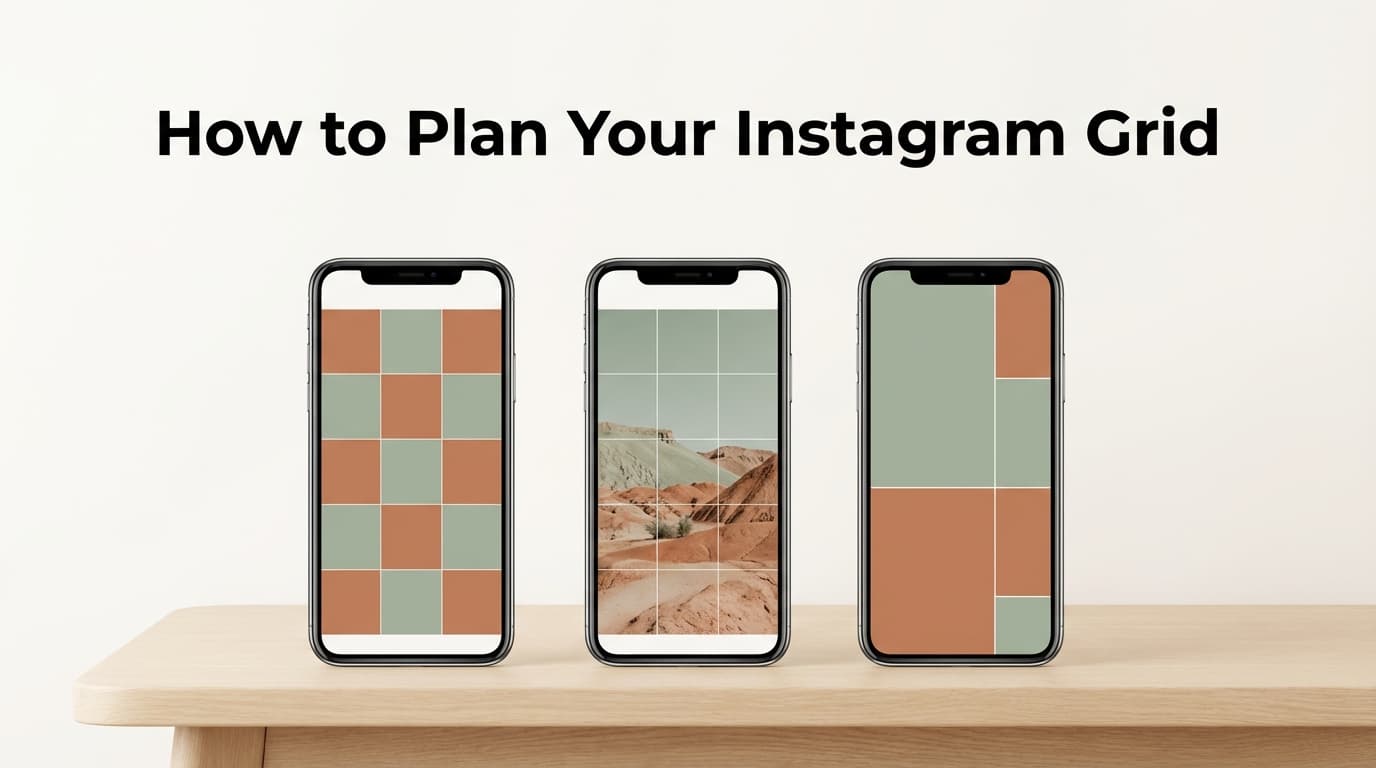
Step 4: Decide your grid layout style (with examples + best use cases)
These are the layouts brands use most, and the ones that come up in most grid guides (Hootsuite, Planable, Sked Social, Plann).
Layout A: Checkerboard (alternating post types)
What it looks like:
Photo, graphic, photo, graphic… (or reel cover, carousel cover, reel cover…)
Best for: brands that want variety but still want structure.
Example pattern:
| Post 1 | Post 2 | Post 3 |
|---|---|---|
| Lifestyle photo | Tip carousel cover | Product photo |
| Quote graphic | BTS photo | Tip carousel cover |
| Product photo | Quote graphic | Lifestyle photo |
Watch out: if your “graphic” posts aren’t consistent, checkerboard can look chaotic.
Layout B: Row-by-row themes (each row tells a mini-story)
What it looks like:
Every row of 3 has one theme or campaign.
Best for: launches, seasonal collections, event-based brands.
Example row themes: - Row 1: “Brand intro” (values + offer + proof) - Row 2: “Education” (3 how-to posts) - Row 3: “Product lineup” (3 product use cases)
Benefit: visitors can scan rows like chapters.
Layout C: Column pillars (each column is a pillar)
What it looks like:
Column 1 = Education, Column 2 = Proof, Column 3 = Offer (repeating).
Best for: service brands and personal brands that sell expertise.
Example column mapping: - Left column: tutorials/how-tos - Middle column: social proof - Right column: offer + CTA posts
Watch out: This requires pre-planning; if you post randomly, the columns break.
Layout D: “One filter / one preset” (photo-led consistency)
What it looks like:
Mostly photography with consistent lighting, editing, and composition.
Best for: lifestyle, hospitality, food, fashion, interior brands.
How to make it brand-level: add a consistent typography system for the few graphic posts you do publish.
Layout E: The “cover system” (brand covers for carousels + reels)
What it looks like:
Cohesive covers even if the actual content varies.
Best for: education-heavy brands, B2B, creators, agencies.
Why it works: it’s easy to keep up and still looks planned.
Layout F: The 9-grid “profile as a website” (starter grid)
This is less about aesthetics and more about clarity. New visitors should understand you in 9 posts.
You can build a 9-grid like a mini sales funnel:
- Top row: who you are + what you do + who it’s for
- Middle row: proof + authority + process
- Bottom row: offers + FAQ + CTA
The next step has a template for this.
Step 5: Build your “Next 9” grid plan (template)
If you’re starting fresh or resetting your profile, plan your next 9 posts as a set.
Template: Brand 9-grid map (fill this in)
| 1) Brand/mission | 2) Who it’s for | 3) Signature result |
| 4) Best content | 5) Proof | 6) Product/service |
| 7) Behind the scenes | 8) FAQ/objection | 9) CTA (DM/book/shop) |
Example (eCommerce skincare brand):
| “Sensitive-skin skincare that works” | “For reactive skin” | Before/after customer result |
| “How to patch test” (carousel) | Review screenshot | Hero product spotlight |
| BTS: manufacturing/ingredients | “Is it fragrance-free?” | “Shop the routine” CTA |
Pro tip: Put at least 2 carousels in your next 9 if education is part of your brand. Carousels still perform well in Socialinsider benchmarks (0.55% avg engagement rate).
Source: https://www.socialinsider.io/social-media-benchmarks/instagram
Step 6: Choose your visual rules (so designers, founders, and agencies can execute)
A grid looks “cohesive” when a few variables are locked:
Visual rules checklist (brand grid edition):
- Color palette: 2 primary + 2 accent + neutrals
- Fonts: 1 headline + 1 body (or 1 font family with weights)
- Photo style: warm/cool, high/low contrast, background style
- Composition: consistent margins, text placement, logo usage
- Cover templates: carousel cover, reel cover, quote cover, promo cover
Template: Mini brand style guide for Instagram
| Element | Rule | Example |
|---|---|---|
| Primary colors | ||
| Accent colors | ||
| Background | ||
| Headline font | ||
| Body font | ||
| Photo editing | ||
| Cover layout | ||
| CTA style |
Pro tip: Don’t watermark every post with your logo. A strong system is recognizable without it.
Step 7: Design for the grid crop (3:4 preview “safe zone”)
This sizing detail catches out a lot of brands:
- Your feed post might be created in 4:5
- But your profile grid preview shows a 3:4 crop
Sprout Social’s sizing guide lists Instagram grid view as 1012 × 1350 px and notes grid view is 3:4.
Source: https://sproutsocial.com/insights/social-media-image-sizes-guide/
What to do in practice
- Keep headlines, faces, logos, and key text centered
- Avoid placing important elements flush to left/right edges
- Use a “safe zone” overlay in Canva/Figma if you can
Quick safe-zone rule:
If your design has text, keep it inside the middle ~80% width of your canvas.
Step 8: Preview your grid before posting (so you don’t “break” the layout)
This is where most brand grids fall apart: someone posts “one quick thing” and the column pattern is gone.
Best practice: preview the next 9–12 posts and reorder before publishing.
A simple workflow
- Batch-create or collect your next 9–12 assets
- Drag-and-drop them into a grid preview tool
- Adjust order until: - colors feel balanced - post types are mixed intentionally - pillars repeat in a stable pattern
- Then schedule/publish
Tool tip: PostQuickAI has a free Instagram Feed Planner for previewing and reordering your grid. It’s free, needs no signup, and adds no watermarks.
/tools/instagram-feed-planner
If you’re managing a brand account (or multiple client accounts), previewing first is often what separates a grid that looks planned from one that looks random.
Step 9: Schedule the grid so you can stay consistent
Once your grid is planned, scheduling keeps it on track, especially if you’re juggling launches, approvals, or several accounts.
PostQuickAI supports scheduling and publishing:
- Instagram feed posts (single image), carousels, videos, and Reels
- Instagram Stories (image, or video up to 60 seconds)
Pricing: PostQuickAI is a paid product with a 7-day free trial on your first plan (card required).
/pricing
Plug-and-play Instagram grid templates (copy/paste)
Template 1: The “Brand Clarity” 9-grid (best for service brands + creators)
Use this when your goal is: “A new visitor instantly understands what we do.”
| Promise (result) | Audience (who) | Positioning (why you) |
| Best tip (carousel) | Proof (testimonial/case) | Offer (what you sell) |
| BTS/values | FAQ (objection) | CTA (DM/book/shop) |
Posting tip: publish these across 2–3 weeks so you can refine based on feedback.
Template 2: The “Pillars in Columns” 12-post grid (best for brands with multiple offerings)
This keeps your profile orderly over time.
Columns: - Column 1 = Education - Column 2 = Proof/Community - Column 3 = Offer/CTA
| Edu #1 | Proof #1 | Offer #1 |
| Edu #2 | Proof #2 | Offer #2 |
| Edu #3 | Proof #3 | Offer #3 |
| Edu #4 | Proof #4 | Offer #4 |
Execution note: If you can’t commit to the cadence, switch to a checkerboard layout (more flexible).
Template 3: The “Balanced Mix” weekly plan (easy mode)
If you post ~4 times/week, plan like this:
| Day | Format | Purpose |
|---|---|---|
| Mon | Carousel | Teach a core idea (pillar: authority) |
| Wed | Reel | Reach + top-of-funnel |
| Thu | Single image | Proof or BTS (trust) |
| Sat | Carousel | Offer-led education + CTA |
Why this works: the formats are mixed, so your grid doesn’t turn into all Reel covers or all quote graphics.
Template 4: Caption framework for brand consistency (fast + repeatable)
Use a consistent caption structure so your brand voice is recognizable.
Template: Hook → Value → Proof → CTA
- Hook: One clear promise or pain point
- Value: 3–7 bullets or steps
- Proof: quick example / result / quote
- CTA: one action (save, comment, DM, click)
Example CTA options: - “Save this for your next shoot.” - “Comment ‘GRID’ and I’ll send the template.” - “DM us ‘ROUTINE’ for recommendations.”
Examples: Instagram grid layout ideas (and which brand types they fit)
Below are common brand scenarios and the layout strategy that tends to fit best.
Example 1: Local service business (salon, clinic, studio)
Goal: trust + bookings
Recommended layout: checkerboard or balanced mix
Post types to anchor the grid:
- Before/after (photo)
- Testimonials (graphic)
- “What to expect” carousel
- BTS team/process
- Booking CTA
Why: service buyers want proof and clarity, not perfect color gradients.
Example 2: DTC / eCommerce brand
Goal: product discovery + conversion
Recommended layout: row-by-row for collections + cover system
Post types:
- Product in use (photo/video)
- How-to-use carousel
- UGC/reviews
- Ingredient/material education
- “Shop the drop” CTA
Pro tip: Build a consistent cover template for educational carousels so they’re easy to spot.
Example 3: Agency / B2B brand
Goal: authority + lead generation
Recommended layout: cover system + column pillars
Post types:
- Case study carousel
- Framework carousel
- Founder POV reel
- Testimonial slide
- “Book a call” CTA
Why: you need scalable packaging that looks polished even with lots of educational content.
Best practices: 12 rules for a cohesive Instagram grid
- Plan your next 9 posts as a unit (not one at a time).
- Lock 3–5 pillars so you don’t post random topics.
- Run 3–6 recurring series so consistency is built-in.
- Use covers for repeatable formats (carousels, reels).
- Design for the 3:4 grid preview crop (keep text centered).
- Source: Sprout Social sizing guide https://sproutsocial.com/insights/social-media-image-sizes-guide/ - Balance post types visually (don’t stack 9 graphics in a row).
- Avoid over-templating (too rigid = boring).
- Build “content batches” (9–12 assets at a time).
- Keep CTA frequency intentional (not every post should sell, but selling can’t be rare either).
- Use carousels strategically for saves/shares and deeper education.
- Source: Socialinsider benchmarks https://www.socialinsider.io/social-media-benchmarks/instagram
- Measure with realistic benchmarks (median engagement varies by industry).
- Source: Rival IQ https://www.rivaliq.com/blog/good-engagement-rate-instagram/
- Document your system so anyone on the team can execute.
Common mistakes to avoid (and how to fix them)
Mistake 1: Treating the grid like a mood board instead of a brand system
Symptom: beautiful posts, unclear positioning.
Fix: rebuild your next 9 using the 5-second brand snapshot + 9-grid map template.
Mistake 2: Ignoring grid cropping (text gets cut off)
Symptom: headlines and faces look awkward in profile view.
Fix: use a centered safe zone; reference 3:4 grid preview sizing.
Source: https://sproutsocial.com/insights/social-media-image-sizes-guide/
Mistake 3: Posting “whatever is ready” (layout breaks)
Symptom: columns/checkerboard patterns collapse.
Fix: preview and reorder your next 9–12 posts before publishing.
Mistake 4: Too many mismatched templates
Symptom: the grid looks like 5 different brands.
Fix: limit yourself to 3–5 core templates and 2 photo styles.
Mistake 5: Only optimizing for the grid, not for the feed
Symptom: profile looks nice, but posts don’t get engagement.
Fix: get the hooks, carousel covers and CTAs right first, then make them look consistent.
Tools to help you plan an Instagram grid (honest recommendations)
Grid preview + planning tools
-
PostQuickAI Free Instagram Feed Planner: preview and reorder your grid visually (drag-and-drop). It’s free, with no signup and no watermarks.
/tools/instagram-feed-planner -
Meta Business Suite: useful for basic planning/scheduling inside Meta’s ecosystem (good baseline if you’re starting).
-
Planable / Later / Planoly / Preview-style apps: common choices for grid preview + workflow (varies by team needs and budget).
Design tools
- Canva: fast template building and team-friendly brand kits.
- Figma: great for a more rigorous design system (especially for teams).
Scheduling (when you need consistency)
- PostQuickAI (scheduler): schedule/publish Instagram posts, carousels, videos, Reels, and Stories. Also supports cross-posting workflows. Paid product with a 7-day free trial on your first plan (card required).
/instagram-scheduler
30-minute action plan: plan your next 9 posts today
- Write your 5-second brand snapshot (5 minutes).
- Pick 3 pillars (5 minutes).
- Choose 2 series you can repeat weekly (5 minutes).
- Fill the 9-grid map with real post ideas (10 minutes).
- Pick a layout style (checkerboard or cover system if unsure) (5 minutes).
- Preview your next 9 in a grid planner and reorder for balance (optional but recommended).
If you do only one thing: stop posting one-by-one and start planning in sets of 9.
Key takeaways
- A strong brand grid needs a clear message, a system, and consistency. Looks come after that.
- Plan around pillars and series, then choose a layout.
- Design for the 3:4 grid preview crop (keep key elements centered).
Source: https://sproutsocial.com/insights/social-media-image-sizes-guide/ - Use benchmarks to stay grounded: Rival IQ reports 0.36% median IG engagement rate (2025).
Source: https://www.rivaliq.com/blog/good-engagement-rate-instagram/ - Carousels remain a strong format in benchmarks (Socialinsider reports 0.55% avg engagement rate).
Source: https://www.socialinsider.io/social-media-benchmarks/instagram
FAQ (People Also Ask–style)
How do you plan an Instagram grid layout?
Plan in this order: brand snapshot → content pillars → recurring series → visual rules → layout pattern → preview next 9–12 posts and reorder before publishing.
How to do a grid template on Instagram?
Instagram itself doesn’t provide a universal “grid template” editor for designing layouts. Most brands use Canva/Figma templates and a grid preview tool to arrange the next 9–12 posts before they go live.
What are some Instagram grid layout ideas?
Common options include: checkerboard, row-by-row themes, column pillars, one-filter/photo-led grids, and “cover system” grids (consistent covers for carousels/reels).
Does Instagram have a grid planner?
Instagram has limited native planning options depending on region/account type, but most creators and brands use third-party grid preview tools to drag-and-drop their upcoming posts and check balance before publishing.
How to plan an Instagram grid for free?
Use a free grid preview tool (or a simple drag-and-drop method), plan your next 9 posts with pillars + series, and keep your design system minimal. PostQuickAI’s Instagram Feed Planner is free, with no signup and no watermarks.
/tools/instagram-feed-planner
What is the 5-3-1 rule on Instagram?
“5-3-1” is commonly used as an engagement routine (e.g., interact with 5 accounts, comment on 3 posts, send 1 DM) or as a content-mix idea depending on who’s describing it. Definitions vary by source, so if you use it, treat it as a light habit rather than a strict rule.
Can you rearrange your Instagram grid after posting?
Instagram has tested/rolled out grid reordering features in some contexts, but availability can vary by account and region. The most reliable approach is still to preview and plan the order before posting.
What size should I design posts so they look good on the grid?
Design with grid cropping in mind. Sprout Social notes grid view is 3:4 and lists grid view as 1012 × 1350 px, meaning your preview can crop the sides of taller posts. Keep key elements centered.
Source: https://sproutsocial.com/insights/social-media-image-sizes-guide/