Schedule Social Posts from ChatGPT, Claude or Cursor
Connect the right PostQuickAI tool set, choose a content group, review a draft and schedule to connected accounts.

Author
Use PostQuickAI from a chat to choose a content group, prepare a draft and schedule it to connected accounts. Connecting grants permissions; it does not replace reviewing the draft, destinations and time.
ChatGPT: connect the remote server
- Open ChatGPT Plugins and choose Add custom MCP server where your account allows it.
- Name it PostQuickAI. Use
https://www.postquick.ai/api/mcpas the server URL and choose OAuth. - Review the requested access, create the plugin, and sign in to PostQuickAI when prompted.
- Install the plugin, start a conversation and select it with @.
Controls depend on your account and workspace policies. Check OpenAI’s current connection instructions if they differ. A custom connection does not mean an app is approved for the public directory.
Claude: choose the connector or local setup
See Claude setup for the remote connector. Its reviewed tool set excludes image, video and music generation. Do not assume every tool available through the full MCP server is available through this connector.
For Claude Code, Cursor and other local MCP clients, use the separate local MCP setup with a PostQuickAI API key. Keep the key in your client’s secret settings; never paste it into a public prompt or screenshot.
Start by checking accounts
List my content groups and the social accounts connected to each. Do not create or publish anything yet.
If the account you want is missing, connect it in that content group in the web app. Connecting PostQuickAI to a chat and connecting a social account to PostQuickAI are separate steps.
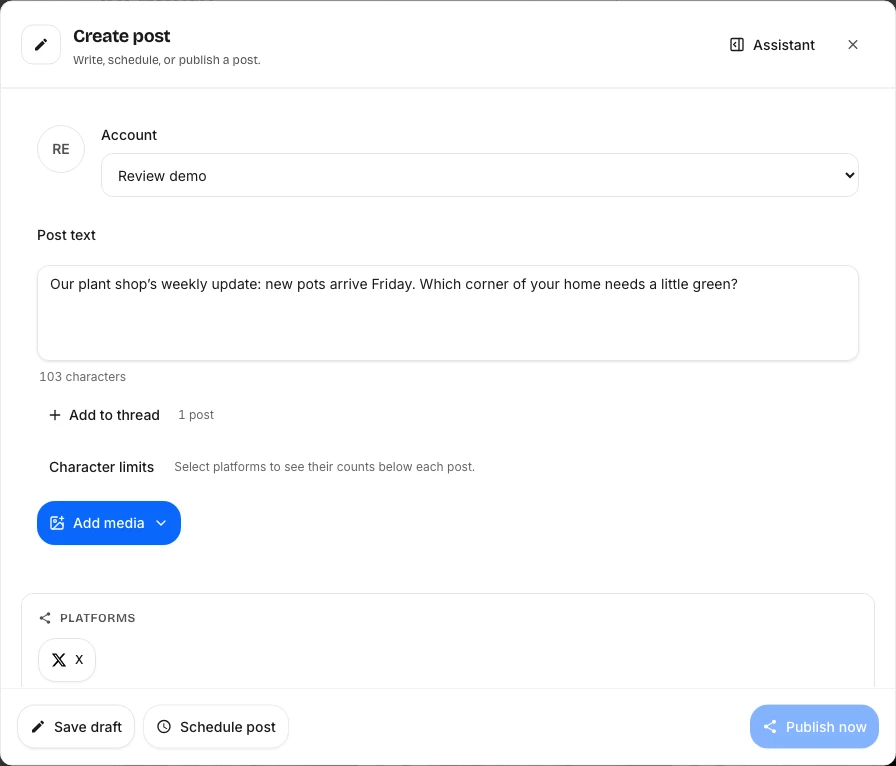
Draft first, then schedule
Create a draft for my plant shop group: new pots arrive Friday. Use only the account I confirm. Show me the caption before scheduling.
Review the returned draft and media. Then confirm the exact account, date, time and time zone. Ask to schedule that draft. For immediate publishing, explicitly say to publish now after your review. For several posts, review every destination and date before requesting a bulk action.
Generating media in ChatGPT
Ask for the currently available models and a cost quote before generating. Image allowance or video credits may be consumed. Video generation is asynchronous: check the job status and wait for the finished asset before adding it to a post. Review the result before scheduling.
Current plans include API access. Generation allowances and platform limits depend on your plan.
To post on a schedule, use PostQuickAI's social media scheduler: write once, pick a time, and it publishes from our servers.