Best Time to Post on Instagram in 2026: Hour-by-Hour Tables for Every Day (+ 14-Day Test Plan)
Posting windows for every day of the week, by format (Reels, Stories, feed) and time zone, plus a 14-day test to find your own best time.

Author
Posting good content at the wrong time wastes the work, and if you manage several client accounts you can’t afford to guess every week.
Generic “best time to post” charts have their own problem: they describe someone else’s audience.
This guide gives you two things:
1) A reliable baseline schedule for 2026 (so you can stop guessing today).
2) A repeatable testing framework to find your account’s best posting times (so results improve month after month).
It also covers: - The best time to post on Instagram in 2026 (quick answer + day-by-day table) - Why timing still matters (and what Instagram says about ranking) - Best times by content format (Reels, carousels, photos, video) - Best times by audience type and industry (practical hypotheses) - How to find your best times using Instagram Insights (step-by-step) - A 14-day timing test you can run for any account (including clients) - How to schedule posts at peak times without manual posting
Quick Answer: Best Time to Post on Instagram in 2026 (Baseline Windows)
If you need a schedule to start with, these windows work for many accounts:
- Morning: 7–9 AM (commute / morning scroll)
- Midday: 10 AM–2 PM (especially 11 AM–1 PM, lunch breaks)
- Evening: 6–9 PM (wind-down / leisure scroll)
The same windows show up in most of the big studies, even though their exact hours differ. For example: - Buffer analyzed 2+ million Instagram posts to identify best times/days/formats. - Later’s guide cites findings based on 6M+ posts. - SocialPilot cites analysis from 50K accounts and 7 million posts. - Hootsuite reports analyzing 1+ million social posts to find best posting times.
Treat these windows as a starting point. They get you close, and your own Insights tell you exactly where to post.
What “Best Time to Post” Actually Means (Reach vs Engagement vs Sales)
Timing advice is often vague because it never says what you’re trying to achieve.
Your “best time” changes depending on what you want:
1) Best time for reach (more people seeing it)
You want to catch the moment when your audience is active and likely to signal interest fast (watch time, sends, saves).
- Best starting windows: lunch + evening
- Best formats: Reels, shareable carousels
2) Best time for engagement (likes/comments/saves/shares)
You want times when people are paying attention, which isn’t the same as when they’re online.
- Best starting windows: mid-morning + lunch
- Best formats: carousels, educational Reels, community posts (questions)
3) Best time for conversions (DMs, clicks, bookings, sales)
You want intent windows: when someone can take the next step without being rushed.
- Best starting windows: lunch + evenings
- Best formats: product demos, offers, FAQs, before/after, client results
For agencies: define the main KPI for each client first (reach, engagement, or leads). Otherwise you’ll tune timing for likes when the business needs bookings.
Why Timing Still Matters in 2026 (Even with a Smart Algorithm)
Instagram has explained that it uses multiple algorithms/systems across surfaces (Feed, Reels, Explore, etc.) and that ranking is influenced by signals that predict what a person will find valuable.
Timing matters because it affects the first wave of performance:
- Post when your audience is active → higher chance of quick interactions
- Quick interactions → stronger early signals → more distribution opportunities
Good timing won’t fix a weak post. It helps good content that you post consistently do a bit better.
The 2026 Baseline Schedule (By Day of Week)
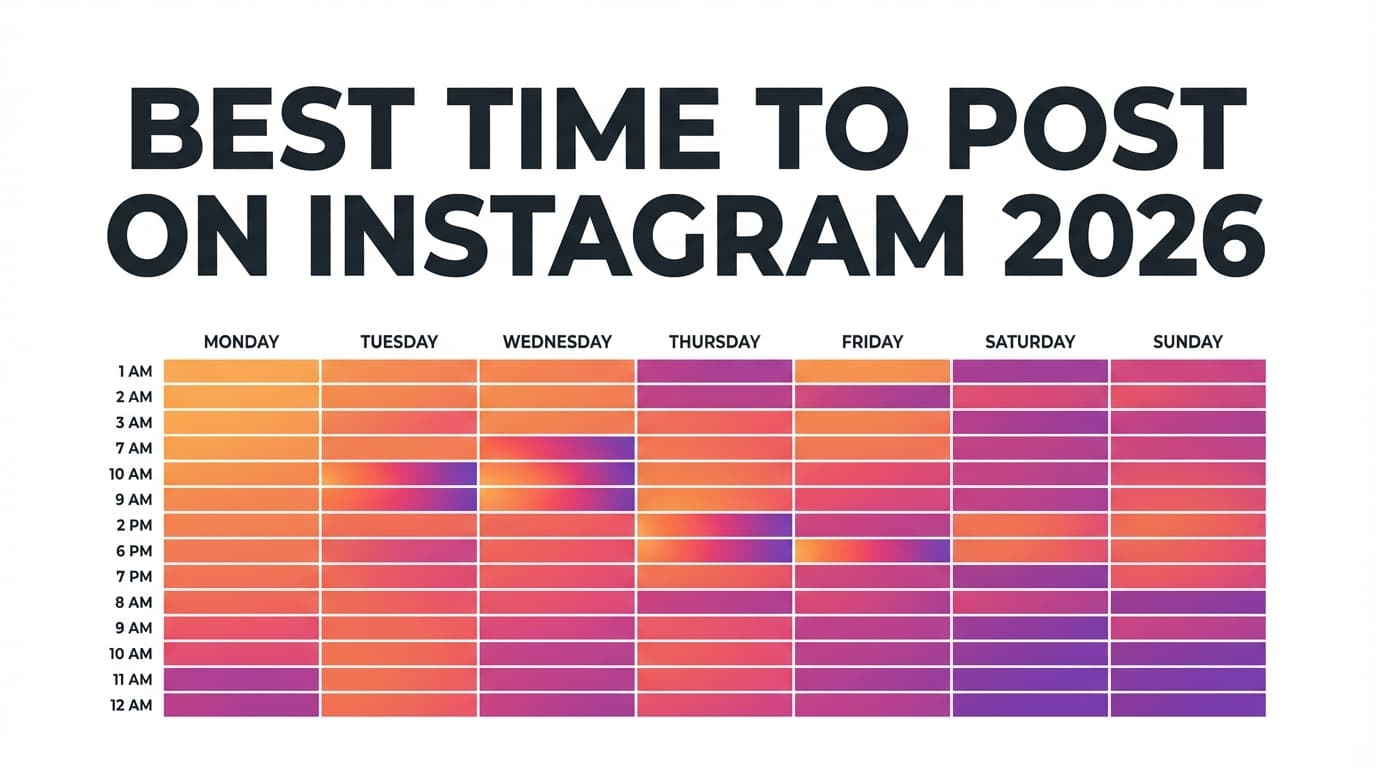
Use this table as your Week 1 baseline before you personalize via Insights.
How to use it: pick 2 time slots per day you can realistically maintain for 2 weeks. Sticking to them matters more than finding the perfect chart.
| Day | Best “start here” times (local time) | Why it often works |
|---|---|---|
| Monday | 11 AM–1 PM, 6–8 PM | lunch break + after-work reset |
| Tuesday | 8–10 AM, 12–2 PM, 6–8 PM | strong weekday routines |
| Wednesday | 9–11 AM, 12–2 PM | midweek stability; strong “save” behavior |
| Thursday | 11 AM–1 PM, 4–6 PM | late-afternoon engagement lift |
| Friday | 11 AM–1 PM, 2–4 PM | earlier start to weekend behavior |
| Saturday | 9–11 AM, 6–9 PM | weekend leisure browsing |
| Sunday | 9–11 AM, 6–9 PM | planning + evening scroll |
“Worst times” (what to test last, not first)
Many datasets report poor results in deep overnight hours (e.g., 2–5 AM) and often weaker performance on some weekend slots, though this varies by audience.
- Buffer notes a “worst time” pattern for Sunday in their dataset.
- Later includes “worst times” in their analysis.
- Mailchimp also discusses worst days/times as general guidance.
A “worst time” can be your best time if your audience works shifts (nurses, hospitality) or lives abroad. Treat it as something to test.
Best Time to Post on Instagram by Format (Reels vs Carousels vs Photos)
Look at each format separately. Your results and your data will both be clearer.
Reels (best time to post in 2026)
Reels often perform well when people have time to watch (or mindlessly scroll):
- Primary test windows: 11 AM–2 PM and 6–9 PM
- Secondary test window: 7–9 AM
Some guides publish Reels-specific timing recommendations.
What to track for Reels (don’t just use likes): - average watch time / retention - shares/sends - follows attributed to the Reel - profile visits
Carousels (best time to post in 2026)
People read carousels carefully and save them, so they often do best when your audience is in the mood to learn something:
- Primary test windows: 9–11 AM and 11 AM–1 PM
- Secondary test window: 6–8 PM
Later includes carousel timing sections and format breakdowns.
What to track for carousels: - saves - shares - completion rate (approximate via swipe behavior if you track slides) - profile visits
Single-image posts
Photos have to land at a glance, so they depend more on an instant reaction:
- Primary test windows: 7–9 AM and 6–8 PM
- Secondary test window: 11 AM–1 PM
What to track: - likes/comments - saves (especially for inspirational or reference-style posts)
Video posts (non-Reels)
If you publish standard video posts (not Reels), treat them as “high attention”:
- Primary test windows: evenings (6–9 PM)
- Secondary test window: lunch (11 AM–1 PM)
Best Times by Time Zone (How to Stop Posting “At the Wrong Local Time”)
Time zones are the most common reason generic charts don’t work for you.
Step 1: Identify your primary audience time zone
Check your top locations in Insights (countries/cities). If your audience is mostly: - US East → use ET as your anchor - UK/Europe → use GMT/BST/CET anchor - Australia → use AEST anchor
Step 2: Use overlap windows if you’re global
If your audience spans regions, you usually need two daily peaks: - Peak A: midday in your largest region - Peak B: evening in your largest region (or overlap with region #2)
Practical “US time zone conversion” cheat sheet
If your baseline slot is 12 PM Eastern: - 9 AM Pacific - 10 AM Mountain - 11 AM Central - 12 PM Eastern
That single slot can cover most of the US during active hours.
A simple global overlap example (US + UK)
If you post at 12 PM ET, it’s 5 PM UK, a common overlap when both audiences can be active.
Best Time to Post by Industry (Smart Hypotheses You Should Test)
Many guides include tables by industry. Use them as clues about your audience’s routine and test them, rather than copying them.
Ecommerce / DTC
- Test: 11 AM–2 PM and 7–9 PM
- Why: lunch browsing + evening shopping
Local services (fitness, salons, clinics)
- Test: 7–9 AM and 5–7 PM
- Why: before/after work planning
B2B education / professional services
- Test: 8–10 AM and 11 AM–1 PM
- Why: planning blocks + lunch breaks
Food, travel, lifestyle
- Test: evenings + weekends
- Why: leisure consumption
How to Find Your Best Time to Post on Instagram (Step-by-Step Using Instagram Insights)
Instagram’s Help Center explains how to view account insights and what insights can include.
Step 1: Open Insights
Common path in the app: Profile → Professional dashboard → Insights
Step 2: Find “Most active times” (hours + days)
You’re looking for: - top 2–3 days - top 2–4 hours on those days
Step 3: Choose a posting strategy (two options)
Option A: Peak-hour strategy
Post 30–60 minutes before the hour spike so the post is already circulating when your audience arrives.
Option B: Split testing strategy
If your audience has two peaks (e.g., noon and 8 PM), run 2-week tests with a balanced distribution.
Step 4: Separate your tests by format
Don’t test a Reel at 8 PM and a carousel at 11 AM and conclude “8 PM is worse.” That tested the format, not the time.
Step 5: Commit to a 14-day experiment
You need enough repetitions to smooth out randomness.
The 14-Day Timing Test (Agency-Friendly and Actually Doable)
It’s designed to fit around a normal workload, even if you run several brands.
Rules (to keep your test clean)
- Keep format consistent: run one format test at a time (e.g., “carousel timing test”)
- Keep topic quality comparable (no “banger” posts only at one time)
- Evaluate at the same time horizon (24 hours after posting, plus 72 hours for Reels)
Tracking template (copy/paste)
Track each post with: - date + time - format - topic/pillar - hook type - reach - likes - comments - saves - shares - profile visits - follows - clicks/DMs (if relevant)
Scoring (simple and effective)
If your goal is growth, weight “high-value” actions:
Score = (Saves × 3) + (Shares × 3) + (Comments × 2) + (Likes × 1)
Then compare average score per time slot.
Decision rule after 14 days
- Keep the top 2 time slots for that format
- Keep 1 wildcard slot (so you don’t stop learning)
- Retest monthly or whenever follower geography shifts
“Best Time to Post” Checklist (Before You Change Your Whole Schedule)
Use this quick checklist to avoid wasting two weeks:
- Is your goal clear? (reach vs engagement vs leads)
- Are you testing one format at a time?
- Are time zones correct for your audience?
- Are you posting consistently (same days each week)?
- Are you judging performance at 24h and 72h (for Reels)?
- Are you tracking saves and shares as well as likes?
Common Mistakes to Avoid (That Make Timing Look “Broken”)
Mistake 1: Changing content style and time at the same time
If you change both, you don’t know what caused the result.
Fix: change one variable (time) for 14 days.
Mistake 2: Posting exactly on the hour every time
Everyone schedules at 12:00, 3:00, 6:00.
Fix: test “off-hour” minutes like 12:13 or 6:41.
Mistake 3: Using only likes as your success metric
Likes are easy to get. Saves and shares tell you more about whether the post was useful.
Fix: pick a scoring system aligned to your goal.
Mistake 4: Ignoring the “content distribution delay”
Some posts build momentum; others spike early.
Fix: compare performance at consistent checkpoints.
Mistake 5: Assuming Stories timing = feed timing
Stories can behave differently. (Not every tool can schedule Stories, so check before you plan around it.)
Tools to Help You Post at the Right Time (Without Manual Posting)
Instagram-native tools
- Instagram Insights / Professional dashboard
- Use Insights to identify follower activity and top-performing content
PostQuickAI (to schedule at peak times consistently)
If your bottleneck is execution (especially across accounts), PostQuickAI supports scheduling and auto-publishing Instagram feed content, including: - Single-image feed posts - Carousel posts - Video posts - Reels (supported via a Reels publishing flow)
See: /instagram-scheduler
Limits to plan around: - Instagram Stories are now supported for scheduling/auto-publishing. - Text-only Instagram posts are not supported (Instagram publishing requires media).
Pricing:
- PostQuickAI is a paid product; your first plan starts with a 7-day free trial (card required)
- Plans start at $15/month
See: /pricing
Free helper tools (no-signup tools)
If you’re batching content and just need fast inputs: - AI Caption Generator: /tools/caption-generator - Hashtag Generator: /tools/hashtag-generator - Instagram Feed Planner (grid preview): /tools/instagram-feed-planner
They help once you know when to post and need to make posts faster.
A Simple Weekly Workflow (So You Actually Hit the “Best Times”)
This works for solo creators and agencies:
Monday (planning + scheduling)
- Choose your week’s 2–3 best time slots
- Batch/schedule posts into those slots
Midweek (15-minute optimization)
- Check which time slot won for the week so far
- Adjust the remaining scheduled posts if needed
Friday (library building)
- Save best-performing topics/hooks
- Turn winners into a repeatable series (carousel templates, Reel hooks)
You need to post often enough to get usable data. If you post once every two weeks, Insights won’t be stable.
Key Takeaways
- The best time to post on Instagram in 2026 is usually within three baseline windows: morning (7–9 AM), midday (10 AM–2 PM), and evening (6–9 PM). Refine them with your Insights.
- The fastest way to find your best times is Instagram Insights → Most active times, then a 14-day test.
- Test timing by format (Reels vs carousels vs photos), not all posts together.
- Time zones can ruin a good schedule, so use overlap windows for global audiences.
- Posting consistently matters as much as timing, and a scheduler makes that easier.
FAQ (People Also Ask)
What is the best time to post on Instagram in 2026?
For many accounts, the strongest starting windows are 7–9 AM, 11 AM–1 PM, and 6–9 PM (local time). Use these as a baseline, then refine using your follower activity in Instagram Insights and a 14-day timing test.
What is the best day of the week to post on Instagram?
Many studies and guides report strong performance midweek (often Tuesday–Thursday), but the best day depends on your audience routine and time zone. The most reliable method is to compare your last 30–90 days of performance by weekday.
What is the best time to post Reels on Instagram?
Start testing Reels during lunch (11 AM–2 PM) and evening (6–9 PM), then confirm with Reel-specific metrics (watch time, retention, shares). A Reels-specific timing guide example: https://www.socialpilot.co/blog/best-time-to-post-reels-on-instagram
How do I see when my followers are most active on Instagram?
Go to Professional dashboard → Insights and look for follower/audience activity (hours and days). Instagram’s Help Center overview of Insights is here: https://help.instagram.com/1533933820244654
Why can’t I see “Most active times” in Instagram Insights?
Common reasons: account type/settings, insufficient data, or app/feature variations. Instagram’s Insights help documentation explains what Insights can include and how to access them: https://help.instagram.com/788388387972460
What is the 3-second rule on Instagram?
It’s a creative guideline (not an official Instagram policy): you have about 3 seconds to get someone’s attention, especially on Reels, so open with a strong hook (movement, a clear headline, a quick payoff).
What is the 4-1-1 rule on Instagram?
It’s a content-mix guideline (not an official Instagram rule). A common version: 4 value posts, 1 soft-sell, 1 direct promotional post. The idea is to keep your feed useful and avoid over-promotion.
Sources
- Buffer (2M+ posts): https://buffer.com/resources/when-is-the-best-time-to-post-on-instagram/
- Later (6M+ posts): https://later.com/blog/best-time-to-post-on-instagram/
- SocialPilot (50K accounts / 7M posts): https://www.socialpilot.co/blog/best-time-to-post-on-instagram
- Hootsuite (1M+ posts): https://blog.hootsuite.com/best-time-to-post-on-instagram/
- Brandwatch (time zones + industry section): https://www.brandwatch.com/blog/best-time-to-post-on-instagram/
- Shopify (2026 complete guide): https://www.shopify.com/blog/time-post-instagram
- Instagram Creators (ranking/algorithms): https://creators.instagram.com/grow/algorithms-and-ranking?locale=en_US
- Instagram Help Center (Insights): https://help.instagram.com/1533933820244654
- DataReportal (Instagram stats context): https://datareportal.com/essential-instagram-stats
To post on a schedule, use PostQuickAI's Instagram scheduler: write once, pick a time, and it publishes from our servers.