Updated October 8, 2026
Schedule a Post in PostQuickAI: A Screenshot Walkthrough

Choose a content group and connect an account
Open PostQuickAI. Choose the content group for this brand or client from the sidebar. Open that group’s account settings and connect the social account you want to use. Check the handle before approving access: the provider may use the account already signed in in your browser.
Write a draft
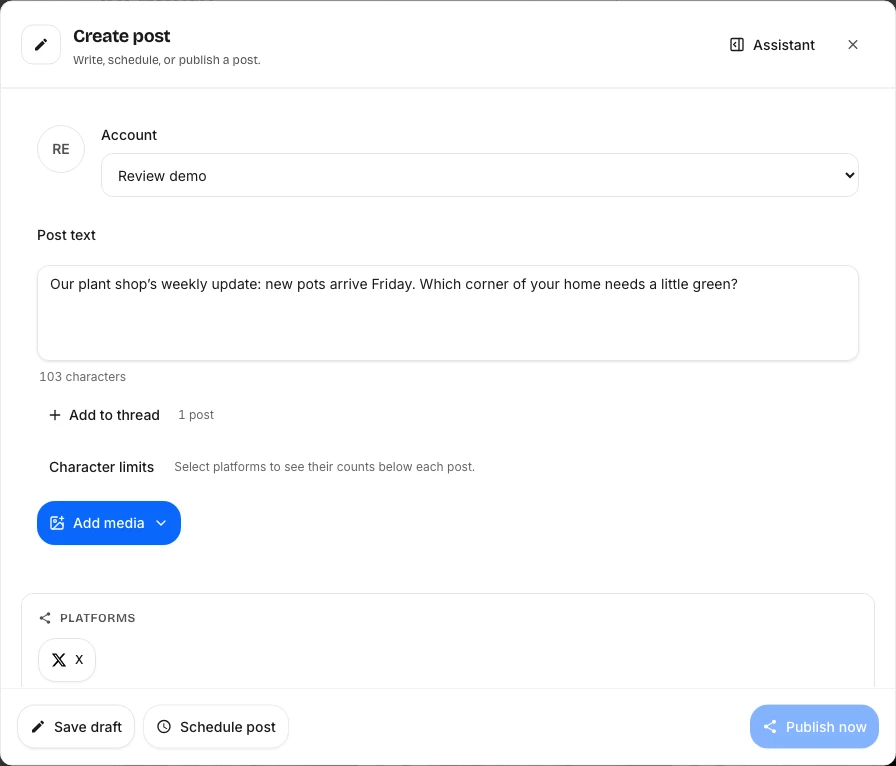
Choose Create → New post. The composer’s Account field selects the content group. Choose it explicitly, then enter your caption. Use Add media for your image, or Add to thread for another text item. Use New carousel, New video or New story for those formats.
Choose where the post goes
Under Platforms, select the connected destinations. Check the preview and character counts for each one. A platform missing from this list needs connecting to the selected group. Don’t select a brand account just because it is available if you meant to post to your personal account.
Choose when it goes
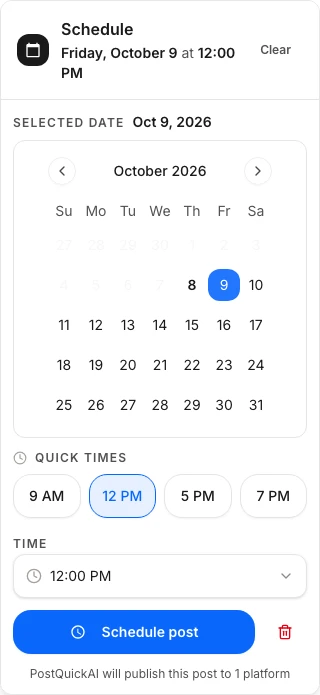
Save draft keeps it for later. Schedule post opens the date and time picker. Check your browser’s local time zone and selected platforms before confirming. Publish now starts publishing immediately; use it only after reviewing the content and destinations.
Check the result
Return to Content or Calendar and find the post. A scheduled time is not proof that a post reached the social network. Check its status after that time and review any error before retrying. Open the destination itself to verify the published result.
Compare plans before subscribing. AI generation can use allowances or credits in addition to scheduling limits.
Choose a plan for your posting workflow
Review account limits, generation allowances and pricing before subscribing.
Compare plans